Your LeagueOrbit rating explained
Where to see your rating, how each match moved it, and what counts.
The names and results shown are made up (the Maple Street Pool League is a demo organization).
Your LeagueOrbit rating is a three-digit number that shows how you play against everyone else in your organization. Every point can be checked by hand.
Where to see it
Open My league. The My LeagueOrbit rating section shows your rating, whether it is still provisional, and how many games it is built on.
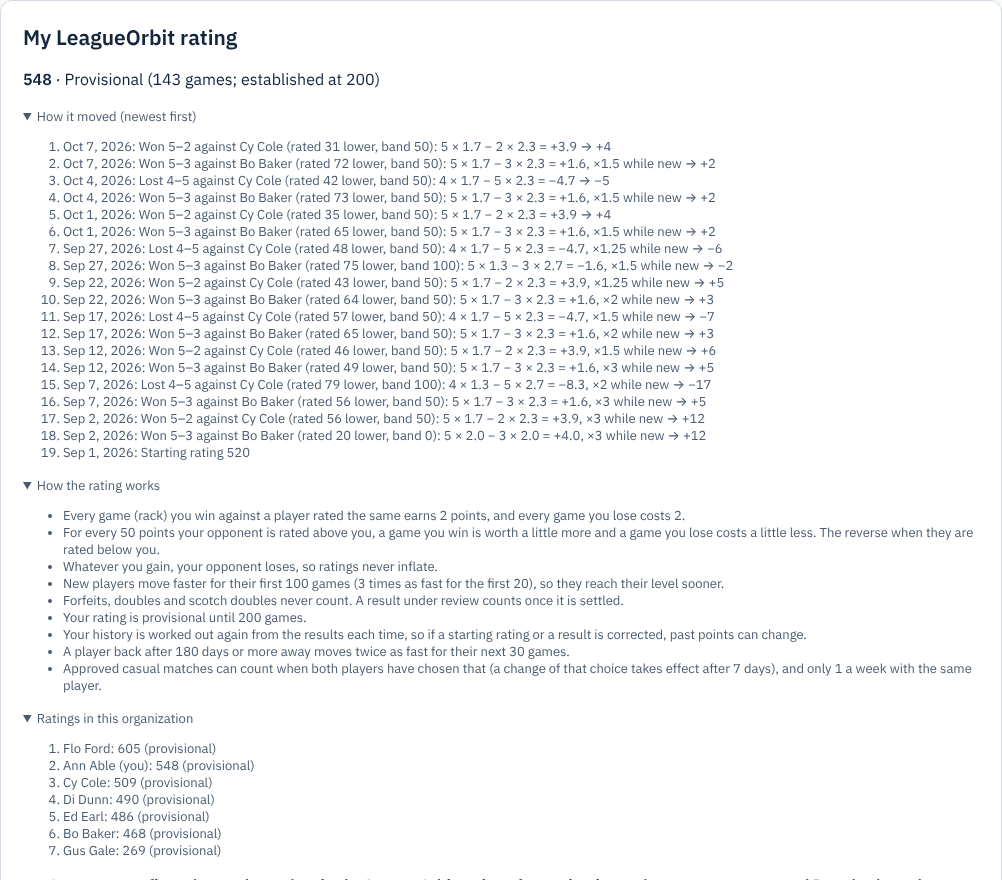
Zoomed picture: My LeagueOrbit rating for Ann Able: 539, provisional (96 games), with "How it moved" open, listing each match with its sum, then "How the rating works", the organization's ratings and the casual-match choice
How each match moved it
Open How it moved. Each line is one match, newest first, written as a sum you can check. For example:
Won 5–2 against Cy Cole (rated 43 lower, band 50): 5 × 1.7 − 2 × 2.3 = +3.9, ×1.25 while new → +5
- Every game you win against a player rated the same earns 2 points; every game you lose costs 2.
- For every 50 points your opponent is rated above you, a game you win is worth a little more and a game you lose costs a little less. The reverse when they are rated below you.
- Whatever you gain, your opponent loses, so ratings never inflate.
- New players move faster for their first 100 games, so they reach their level sooner. Your rating is provisional until 200 games.
What counts
Singles games on finalized league match sheets and singles tournament results count. Forfeits, doubles and scotch doubles never count. A result under review counts once it is settled. Approved casual matches count only if both players chose that (see Play a casual match and confirm it).
Your starting rating is set by your league operator. You can never change your own rating.