Play a casual match and confirm it
Score a match against a friend, send them a code, and have it confirmed.
The names and results shown are made up (the Maple Street Pool League is a demo organization).
A casual match is any match you play outside league night. One player records it and the other confirms it, so both journals show the same result.
Record the match
- Open Play a match from the menu.
- Choose the game and the race, then score rack by rack as you play (or enter the final score).
- If your opponent has a LeagueOrbit account, tick My opponent has a LeagueOrbit account and will confirm the result. When you save, you get a code, a link and a QR code to show them.
Confirm a match someone saved against you
- Open Play a match and go to Confirm a match, or open the link your opponent sent.
- Type the code and choose Check the code.
- Check the date, game, race and score. Choose Confirm this match if it is right, or Reject it if it is not.
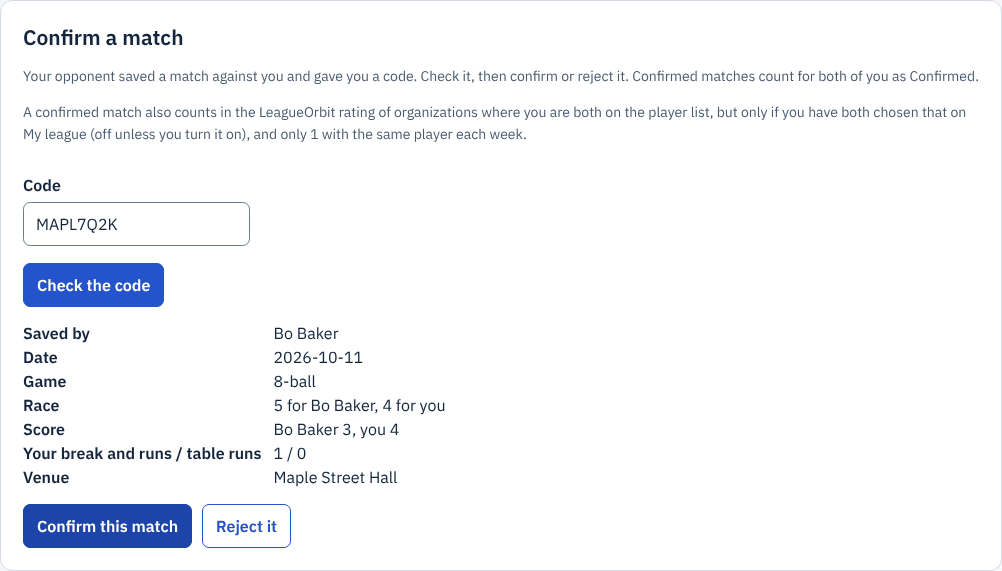
Zoomed picture: Confirm a match: the code has been checked and the match shows "Saved by Bo Baker", the date, 8-ball, race 5 for Bo Baker and 4 for you, score Bo Baker 3, you 4, and Confirm and Reject buttons
Does it count in my rating?
A confirmed casual match can count in the LeagueOrbit rating of an organization where you are both on the player list, but only if you have both chosen that on My league. The choice is off until you turn it on, a change takes effect 7 days later, and only 1 casual match a week with the same player counts. See Your LeagueOrbit rating explained.