Keep score on the Scoreboard
Score any match at the table on your phone or tablet, full screen, and keep it in your stats.
The names and results shown are made up (the Maple Street Pool League is a demo organization).
The Scoreboard keeps score for any match: a practice set, a friendly match, or a league or tournament match. It runs on your phone or tablet, and nothing is sent until you choose to keep the match.
Start a match
- Open Scoreboard from the menu.
- Under New match, enter both players' names, choose the game, and set each player's race. A handicapped race works: give each player their own number.
- Choose who breaks first and the break rule: players take turns, the winner breaks, or the loser breaks.
- Choose Start scoring.
Score it
- Tap a player's big score to give them a rack.
- Use + and − to add or take back a rack for that player.
- Use BR when a player breaks and runs the rack, and TR when they run the table from their first turn without breaking. Each adds a rack and is counted in your statistics.
- The cue ball shows who breaks next. If the wrong player broke, choose Switch who breaks: the cue ball moves, and the break rule you chose carries on from there.
- On the hill shows when a player needs one more rack.
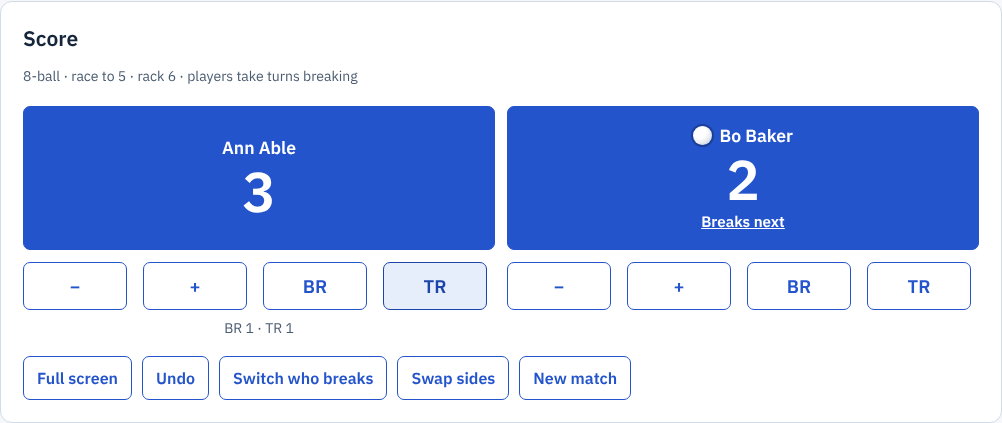
Zoomed picture: The Scoreboard during a match: Ann Able 3, Bo Baker 2, race to 5, with the cue ball and Breaks next on Bo Baker, the minus, plus, BR and TR buttons under each player, and Full screen, Undo, Switch who breaks, Swap sides and New match
For straight pool, the buttons change to points: +1, +5, −1 for a foul, and −16 for a third foul in a row.
Full screen at the table
Choose Full screen to show only the score, large enough to read across the table. Back returns to the normal page. Where your phone allows it, the screen stays on while the Scoreboard is full screen.
Keep it in your stats
When a player reaches their race, the Scoreboard shows the winner.
- Choose Keep it in your stats. Record a match opens with the date, game, players, race, score, break and runs and table runs filled in.
- Choose which player you were.
- If you like, give the match a name, for example John vs George.
- Choose Save match.
A match kept from the Scoreboard also keeps every rack in order, so you can open it later on My stats and see who broke and who won each rack. See Your stats and match history.
League and tournament matches
At the top of the Scoreboard, Your league and tournament matches lists:
- league match sheets open for you: choose Start scoring to score your games on the league's match sheet;
- tournament matches, when the director lets players report their own scores. See Report your tournament score.