Report your tournament score
Send your match score to the tournament from the Scoreboard, and what happens next.
The names and results shown are made up (the Maple Street Pool League is a demo organization).
Some tournament directors let players report their own scores. When yours does, your match shows on your Scoreboard as soon as it is ready or on a table.
Find your match
- Open Scoreboard from the menu.
- Under Your league and tournament matches, look for Tournament matches. Each match shows both players, the tournament, the table and the race.
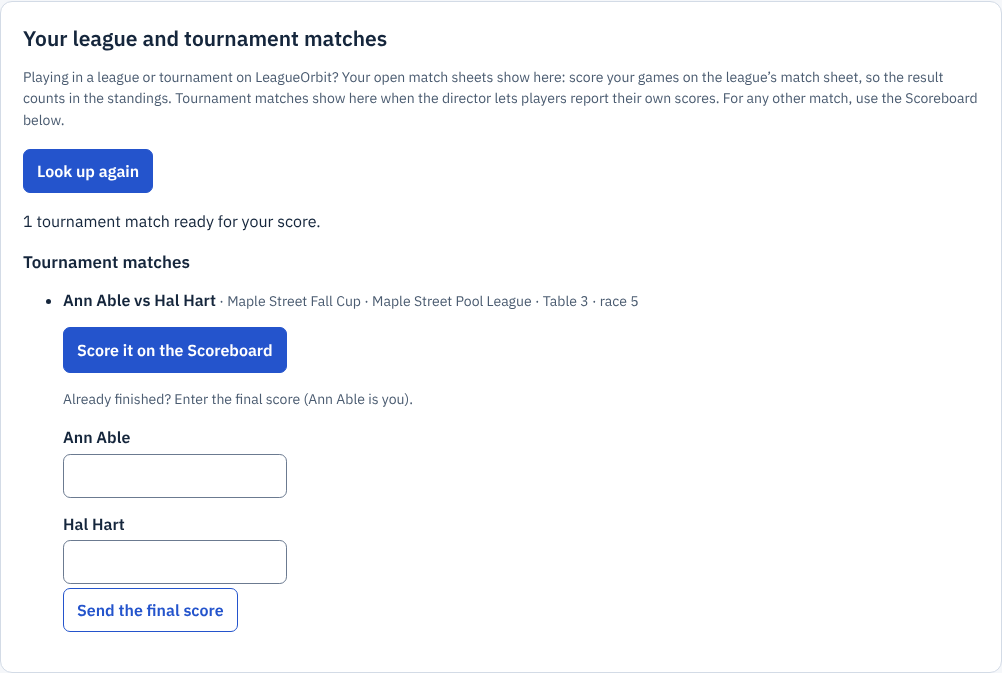
Zoomed picture: Your league and tournament matches on the Scoreboard: Ann Able vs Hal Hart in the Maple Street Fall Cup on Table 3, race 5, with Score it on the Scoreboard and boxes to enter the final score
Your sign-in must be linked to your player on the organization's list. If you entered online, it already is.
Score it and send it
- Choose Score it on the Scoreboard. The board is set up with both players and the race.
- Play the match, scoring each rack.
- When it is won, choose Send the score.
If you kept score somewhere else, type the final score for each player under Already finished? and choose Send the final score.
What happens next
- Your opponent sends the same score: the result is recorded at once and the bracket moves on.
- Your opponent sends a different score: nothing is recorded. The director sees both scores and enters the result.
- You made a mistake: send the right score again. You can change it until the match has a result.
The director can always enter or correct a result.
For directors: turn it on
- Open the tournament and go to Setup.
- Tick Players report their own scores and save.
You can turn it on or off at any time, also after the draw. It works with race scoring, not team points. A match where the players' scores differ shows Scores differ with both scores on its card under Matches; enter the result to settle it.