Create an account and join a league
Find a league near you, ask to join, and see when the league says yes.
The names and results shown are made up (the Maple Street Pool League is a demo organization).
You can join a league or tournament without a code. Here a player looks for the Maple Street 8-Ball league.
Find a league
- Sign in at app.leagueorbit.com. If you are not in a league yet, you start on Get started.
- Under Find a league or tournament, type a few words (for example friendly) and your city or state, then choose Search.
- Each result shows the league, the organization, where and when it plays, and the game.
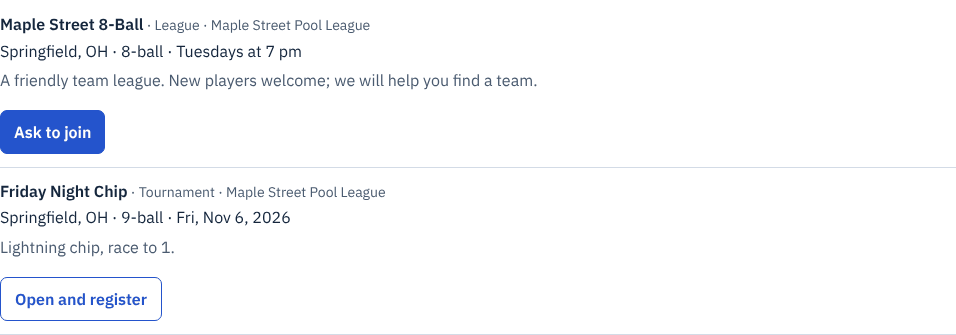
Zoomed picture: Search results on Get started: the Maple Street 8-Ball league in Springfield, OH, Tuesdays at 7 pm, with an "Ask to join" button, and the Friday Night Chip tournament with a "View tournament page" link
Ask to join
- Choose Ask to join on the league you want.
- Add a short note if you like (for example, which nights you can play). Your email is not shared with the league unless you tick the box.
- Choose Send request. Your request appears under Your requests to join, where you can withdraw it while it is waiting.
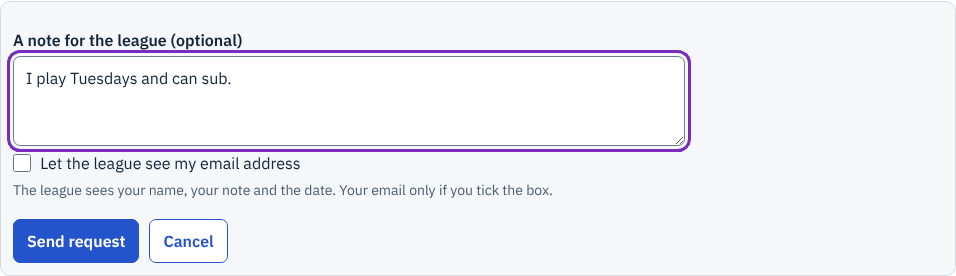
Zoomed picture: The "Ask to join" form: an optional note saying "I play Tuesdays and can sub.", an unticked box to let the league see your email, and a Send request button
When the league says yes
The league's staff see your request on their Players page. When they approve it, the league appears on My league and they can place you on a team. If they decline, you see their reason.
For a tournament, open its page from the result and register there.